Share a Donation Link
A web address for giving, ready to share in emails, WhatsApp messages and social posts.
A Link is a web address that takes donors straight to giving. Share it in your newsletter, your WhatsApp groups, or a social post. You don't need a website or the embed code.
Donation Link or Campaign Page Address?, copy link to this section
Every published campaign already has its own hosted page, with an address you can copy and share. A donation link points at that same page, and adds a few things on top:
| Campaign page address | Donation link | |
|---|---|---|
| Where it goes | One campaign's page | The campaign or campaign group you choose, which you can change at any time |
| What opens | The page | The page, or the page with the checkout already open |
| Amount and frequency | The donor chooses | You can pre-set them, such as $50 monthly |
| Results | Counted with the campaign | Also counted for this link in the Elements table |
| Turning it off | End or unpublish the campaign | Switch off this link only |
Share the campaign page address when you just want people to see the campaign. Create a donation link when you're sharing somewhere you can't edit later, like a WhatsApp broadcast or a printed newsletter, or when you want to see which channel brings in the most gifts.
Create a Donation Link, copy link to this section
Create the link
In your dashboard, go to Sites → Elements and click New element. Give it a name your team will recognize, such as "WhatsApp broadcast", choose Link as the type and click Create element.
Choose where gifts go
On the Behavior tab, choose the campaign under Content. Under Opens in, Checkout Modal opens your campaign's page with the checkout already open, ready for a gift. Hosted Page opens the page itself.
Use Prefill to choose the frequency or amount the checkout opens with. Donors can still change it.
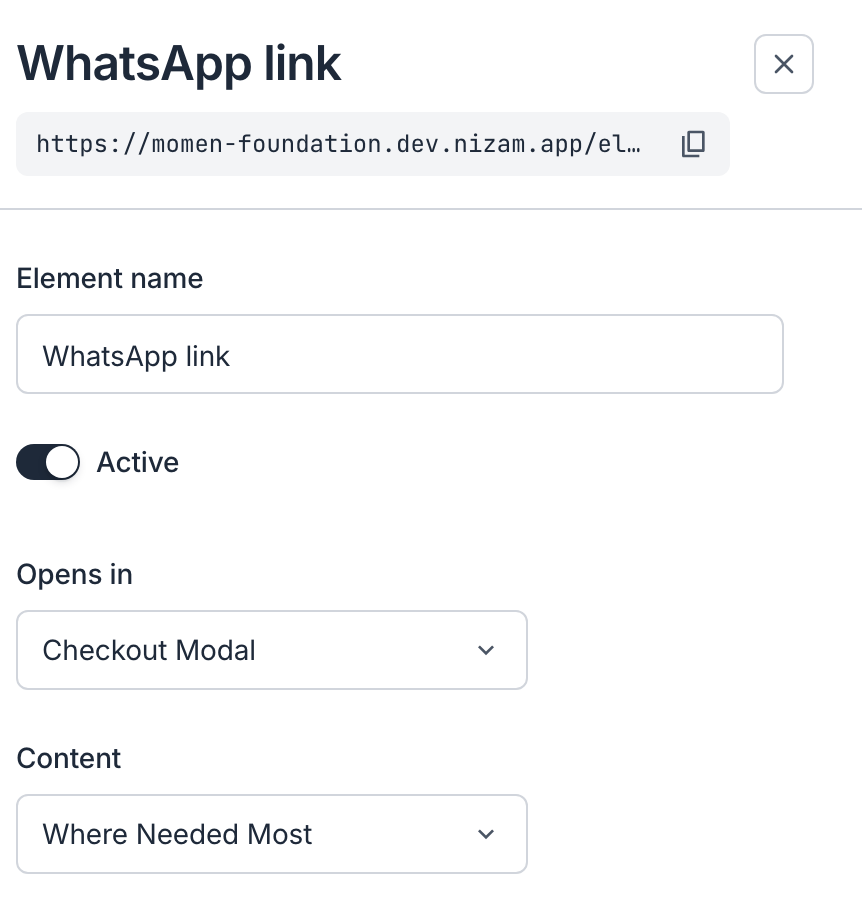
Copy and share it
The link's web address is under its name. Click it to copy, then paste it wherever you're sharing. Your link appears once your organization is approved.
Open the link yourself first to check it goes to the right campaign.
Changing the Campaign Later, copy link to this section
The link's address belongs to the element. Point the element at a new campaign, and everyone who already has the link goes to the new one. You never need to send a new link.
To stop the link from taking gifts, switch off Active on the element.
Use a separate link for each place you share, such as one for WhatsApp and one for your newsletter. The Elements table then shows which one brings in the most gifts.